Education Library
Auto Messaging
This is the reporting of the system that sends out email and text messages built in the campaign manager.Patients Contacted
Total contacts that received messages within your set timeframe.Open Rate
Total contacts that opened an email message divided by total contacts that received an email. Open rates only apply to email messages.Click Rate
Total contacts that opened and clicked on a link in an email message divided by total contacts that received an email. Click rates only apply to email messages.Text Success Rate
Total contacts that successfully received the text message divided by total contacts that the system attempted to deliver the message to. This data comes directly from your text service provider. Reasons for unsuccessful delivery:- The phone number is a landline and cannot accept SMS
- The phone number is invalid
- The phone number is disconnected
- For more reasons, refer to delivery reports in your text service provider account.
Revenue Generated
Calculation of contacts that received a text message and then created an appointment with a bill within 10 business days of the message sent date. Revenue generated is only available for text messages.Trend
The trend graph defaults to displaying text trends and you can switch to view by email trend by toggling between the icons at the top of the screen. Click View Detail on any column to see the list of data that make up that trend. If the data set is too large then View Detail will appear gray and will not be available. Once the data is a small enough sample, the View Detail will appear blue and can be opened.
Metrics
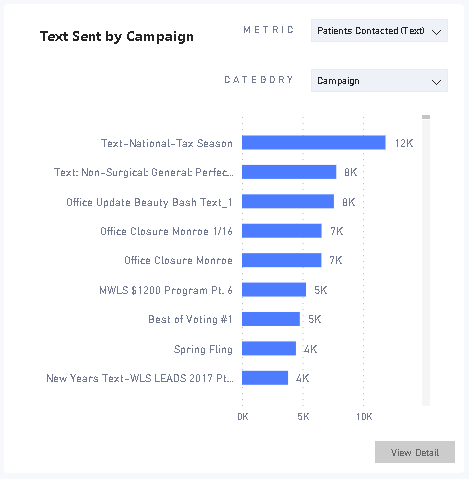
Text Success Rate Total contacts that successfully received the text message divided by total contacts that the system attempted to deliver the message to. Total texts Total number of text recipients. Appts Created Total appointments created within 10 business days of the text send date. Revenue Generated Total of bills associated to appointments created within 10 days of the text send date. Payments Generated Total payments made towards revenue generated. Revenue per text The total revenue generated by that campaign is divided by the total recipients. Text Conversion Contacts that received a text then created an appointment within 10 business days. Patients Contacted Total contacts that received messages within your set timeframe.Text Sent by Campaign
Group metric from the dropdown to each category during that timeframe. For example, you can select a metric of Patients Contacted and a category of Campaign to see patients contacted in each campaign during that time.